- Prison Code Breaker Diary -

=> aka: Nhật Kí Code Tù

Categories

Showing posts with label C++. Show all posts

#include 

#define CreateFunction( FunctionName, Operator, Type ) \
  Type FunctionName( Type a, Type b ) \
  { \
   return a Operator b; \
  }

CreateFunction( Add, +, int )
CreateFunction( Sub, -, float )
CreateFunction( Mul, *, long )

using std::cout;
using std::endl;

int main( )
{

 cout << "CreateFunction(Add, +, int)"    << endl
   << "10 + 15 = "   << Add( 10, 15 )    << endl
   << "CreateFunction(Sub, -, float)"   << endl
   << "12.4 - 4.34 = " << Sub( 12.4, 4.34 )  << endl
   << "CreateFunction(Mul, *, long)"    << endl
   << "40 * 123 = "   << Mul( 40, 123 )   << endl;

 return 0;
}
The 3 lines
CreateFunction( Add, +, int )
CreateFunction( Sub, -, float )
CreateFunction( Mul, *, long )

will be expanded during compile time.

A well-known trick under GNU/C.

I write this bash script to automate the process of creating Linux libraries in C/C++

#!/bin/bash

clear

echo -e "##########################################"
echo -e "#     LIBRARY AUTO-CREATOR by [JaPh]     #"
echo -e "#========================================#"
echo -e "Usage: `basename $0` lib_name type path   "
echo -e "Example: "
echo -e " + creating libraries from hello.c in current directory"
echo -e " `basename $0` hello C . "
echo -e " + creating libraries from bye.cpp to '/opt/lib' directory"
echo -e "   `basename $0` bye C++ /opt/lib"
echo -e "Feel free to contact, pete.houston.17187@gmail.com\n"

ARG=3

if [ "$#" -ne "$ARG" ]
then
 echo -e "[?] wrong input arguments!"
 exit
fi

libname=lib"$1"

if [ "$2" == "C" ]
then
 filename="$1.c"
 compiler="gcc"
elif [ "$2" == "C++" ]
then
 filename="$1.cpp"
 compiler="g++"
else
 echo -e "[?] unknown filetype"
 exit
fi

echo -e "< Static Library: $libname.a >"
command="$compiler -Wall -c $filename"
echo -e "\$ $command"
if [ !`$command` ]
then
 echo -e ".created: $1.o"
else
 echo -e ".[?] cannot create object $1.o"
 exit
fi

echo -e "\$ ar -cvq $libname.a $1.o"
ar -cvq $libname.a $1.o
echo -e ".created: $libname.a"
echo -e "< Static Library '$libname.a' created ! >"

rm -f $1.o
echo -e "< Shared Object Library: $libname.so.1.0 >"
command="$compiler -Wall -fPIC -c $1.c"
echo -e "\$ $command"
if [ !`$command` ]
then
 echo -e ".created: $1.o"
else
 echo -e ".[?] cannot create object $1.o"
 exit
fi

command="$compiler -shared -Wl,-soname,$libname.so.1 -o $libname.so.1.0 $1.o"
echo -e "\$ $command"
if [ !`$command` ]
then
 echo -e ".created: $libname.so.1.0"
else
 echo -e ".[?] cannot create shared object $libname.so.1.0"
 exit
fi

ln -sf $libname.so.1.0 $libname.so
ln -sf $libname.so.1.0 $libname.so.1

echo -e "< Shared Object Library '$libname.so.1.0' created ! >"

if [ "$3" != "." ]
then
 mv $libname.* "$3"
 echo -e "[!] All files moved to $3"
fi


STATIC LIBRARY (.a)

+ Compile

$ gcc -Wall -c *.c
+ Create library
$ ar -cvq libtest *.o
+ List files in library
$ ar -t libtest.a
+ Linking with library
$ gcc -o executable-name prog.c libtest.a
$ gcc -o executable-name prog.c -L/path/to/library-dir -ltest


Shared Object: DYNAMICALLY LINKED LIBRARY

+ Compile object
$ gcc -Wall -fPIC -c *.c
+ Create shared object
$ gcc -shared -Wl,-soname,libtest.so.1 -o libtest.so.1.0 -o *.o
+ Move library to destination
$ mv libtest.so.1.0 /path/to/lib-dir
+ Allow naming convention like -ltest
$ ln -sf /path/to/lib-dir/libtest.so.1.0 /path/to/lib-dir/libtest.so
+ Allow run-time binding to work
$ ln -sf /path/to/lib-dir/libtest.so.1.0 /path/to/lib-dir/libtest.so.1
+ Testing executable file dependencies
$ ldd executable-file


Reference: Yo-Linux

Original Discussion: -> [Cviet]

Code Relax #2 [ by rox_rook  ]

Given a template to get sum below

template< typename T >
inline
T calculate_sum_of_element( const T* i, const T* e )
{
    T sum = T( ); // a zero value for any type
    while( i != e )
    {
        sum += *i;
        ++i;
    }

    return sum;
}

Try this on int and char array

#include <iostream>

using namespace std;

template< typename T >
inline
T calculate_sum_of_element( const T* i, const T* e )
{
    T sum = T( ); // a zero value for any type
    while( i != e )
    {
        sum += *i;
        ++i;
    }

    return sum;
}

int main( )
{
    int int_ary[ 3 ] = { 1, 2, 3 };
    cout << calculate_sum_of_element( int_ary, int_ary + 3 ) << endl;
    
    char char_ary[ 3 ] = { 'a', 'b', 'c' };
    cout << calculate_sum_of_element( char_ary, char_ary + 3 ) << endl;
    return 0;
}

The result for int is 6 as expected; however, for char it supposed to be 97 + 98 + 99 = 294, but the character '&' is printed out.

Requirement
+ Re-write the given template function to make char data type return an int value
+ Language in use: C++

Solution [ by author, rox_rook ]

#include <iostream>
#include <fstream>
#include <iostream>
#include <string>

using namespace std;

template< typename T >
class Trait;

template< >
class Trait< char >
{
public :
    typedef int SumType;
    static SumType zero( )
    {
        return 0;
    }
};

template< >
class Trait< short >
{
public :
    typedef short SumType;
    static SumType zero( )
    {
        return 0;
    }
};

template< >
class Trait< unsigned >
{
public :
    typedef unsigned SumType;
    static SumType zero( )
    {
        return 0;
    }
};

template< >
class Trait< double >
{
public :
    typedef double SumType;
    static SumType zero( )
    {
        return 0;
    }
};

template< >
class Trait< int >
{
public :
    typedef int SumType;
    static SumType zero( )
    {
        return 0;
    }
};

template< typename T >
inline
typename Trait< T >::SumType calculate_sum_of_element( const T* i, const T* e )
{
    typedef typename Trait< T >::SumType SumType; // create shortcut, less typo
    SumType sum = Trait< T >::zero( );
    while( i != e )
    {
        sum += *i;
        ++i;
    }

    return sum;
}

int main( )
{
    char char_ary[ 3 ] = { 'a', 'b', 'c' };
    cout << calculate_sum_of_element( char_ary, char_ary + 3 ) << endl;
    double d_ary[ 3 ] = { 1.1, 2.2 , 3.3 };
    cout << calculate_sum_of_element( d_ary , d_ary + 3 ) << endl;    
    int i_ary[ 3 ] = { 1, 2 , 3 };
    cout << calculate_sum_of_element( i_ary , i_ary + 3 ) << endl;      
}


Evaluation
- It's freaking unthinking of....lol

Original Topic Discussion => [Cviet]

Relax #1 [ by me ]

Given 3 functions:

int add( int _a, int _b ) { return _a + _b; }
int sub( int _a, int _b ) { return _a - _b; }
int mul( int _a, int _b ) { return _a * _b; }

Implement the following program:
+ Prompt user to input 1 of 4 strings: "add", "sub", "mul" or "end"; otherwise, start program again; "end" to exit.
+ Then, prompt user to input 2 numbers
+ Output result in this form

A [operator] B = [result]

Operator must be one of the following '+', '-' and '*', according to its own function, which means string "add" match add() function ....

Requirement
+ Must use function pointer
+ Call function according to its name, call add() if user prompt "add"....so on.
+ Language to use: C, C++

Demo output

> type 'add', 'sub', 'mul' or 'end': add
 a = 1
 b = 2
 1 + 2 = 3
> type 'add', 'sub', 'mul' or 'end': sub
 a = 6
 b = 4
 6 - 4 = 2
> type 'add', 'sub', 'mul' or 'end': mul
 a = 12
 b = 1
 12 * 1 = 12
> type 'add', 'sub', 'mul' or 'end': end

PROGRAM ENDED ! 


Solution #1 [ by me ]


Code in C as following:

#include <stdio.h>
#include <stdlib.h>
#include <string.h>

#define MAX_SIZE    1024

//
// #struct JFUNC
//
struct JFUNC {
    char *name;                 // function name
    int (*func)(int, int);      // pointer to function
    char sign;                  // sign of function, '+', '-', '*'
};

//
// #function        say()
// #purpose         format output with given params
//
void say( int (*func)(int,int), int _a, int _b, char _ )
{
    printf(" %d %c %d = %d\n", _a, _, _b, func( _a, _b ) );
}

//
// #function        input()
// #purpose         get input from user
//
void input( int *a, int *b ) {
    printf(" a = "); scanf("%d%*c", a);
    printf(" b = "); scanf("%d%*c", b);
}

//
// #function        add(),sub(),mul()
// #purpose         provide regular calculation
//
int add( int _a, int _b ) { return _a + _b; }
int sub( int _a, int _b ) { return _a - _b; }
int mul( int _a, int _b ) { return _a * _b; }
//int div( int _a, int _b ) { return _a / _b; }

/* ENTRY POINT */
int main( )
{
    // init array of 3 structs
    struct JFUNC calc[3] = {
        { "add", add, '+' },
        { "sub", sub, '-' },
        { "mul", mul, '*' }
    };
    int a, b; // input from user
    int idx; // index of struct JFUNC array
    char *key = (char *)malloc( MAX_SIZE * sizeof(char) ); // string to get from user
    do {
   
        printf("> type 'add', 'sub', 'mul' or 'end': " );
        // get input, exactly 4 bytes
        fgets( key, MAX_SIZE, stdin );     

        // iterate through array to get correct function
        for( idx = 0; idx < 3; ++idx ) {
            // if function name is matched
            if( strcmp(calc[idx].name, key) == 0 ) {
                // get input
                input( &a, &b );
                // output
                say( calc[idx].func, a, b, calc[idx].sign );
            }
        }
    // end program if "end" prompted
    } while ( strcmp(key, "end") != 0 );
   
    // free memory
    free( key );
   
    printf(" PROGRAM ENDED!\n");
    // program return
    return 0;
}

Code in C++ as following

#include <iostream>

using namespace std;

//
// #struct JFUNC
//
struct JFUNC {
    string name;                    // function name
    int (*func)(int, int);      // pointer to function
    char sign;                  // sign of function, '+', '-', '*'
};

//
// #function        say()
// #purpose         format output with given params
//
void say( int (*func)(int,int), int _a, int _b, char _ )
{
    cout << " " << _a << " " << _ << " " << _b << " = " << func( _a, _b ) << "\n";
}

//
// #function        input()
// #purpose         get input from user
//
void input( int *a, int *b ) {
    cout << " a = "; cin >> *a;
    cout << " b = "; cin >> *b;
}

//
// #function        add(),sub(),mul()
// #purpose         provide regular calculation
//
int add( int _a, int _b ) { return _a + _b; }
int sub( int _a, int _b ) { return _a - _b; }
int mul( int _a, int _b ) { return _a * _b; }
//int div( int _a, int _b ) { return _a / _b; }

/* ENTRY POINT */
int main( )
{
    // init array of 3 structs
    struct JFUNC calc[3] = {
        { "add", add, '+' },
        { "sub", sub, '-' },
        { "mul", mul, '*' }
    };
    int a, b; // input from user
    int idx; // index of struct JFUNC array
    string key; // string to get from user
    do {
   
        cout << "> type 'add', 'sub', 'mul' or 'end': ";
        // get input, exactly 4 bytes
        cin >> key;

        // iterate through array to get correct function
        for( idx = 0; idx < 3; ++idx ) {
            // if function name is matched
            if( calc[idx].name == key ) {
                // get input
                input( &a, &b );
                // output
                say( calc[idx].func, a, b, calc[idx].sign );
            }
        }
    // end program if "end" prompted
    } while ( key != "end" );
   

    cout << " PROGRAM ENDED!\n";
    // program return
    return 0;
}

Solution #2 [ by tauit_dnmd ]

/*
  UITs:UITstudent.com
  Coder:tauit_dnmd.
*/
#include<iostream>
#include<string>
using namespace std;
typedef int (*MyType)(int,int);

int  add( int _a, int _b ) { return _a + _b; }
int sub( int _a, int _b ) { return _a - _b; }
int mul( int _a, int _b ) { return _a * _b; }

int (*GetFunctionVerSion1(string s,char &oper))(int,int) 
{
        if(s=="add"){oper='+'; return &add;}
        if(s=="sub"){oper='-';return ⊂}
        if(s=="mul"){oper='*'; return &mul;}
}

MyType GetFunctionVerSion2(string s,char &oper)
{
        if(s=="add"){oper='+'; return &add;}
        if(s=="sub"){oper='-';return ⊂}
        if(s=="mul"){oper='*'; return &mul;}
}

int main()
{
    int (*uitstudent)(int,int)=NULL;//define 
    int a,b;
    string myoperator;//operator
    char UITs;
    do
    {
        do
        {
            cout<<"type 'add' 'sub' 'mul' or 'end':"; 
            cin>>myoperator;
            if(myoperator=="add"||myoperator=="sub"||myoperator=="mul"||myoperator=="end") break;
        }while(1);
        if(myoperator!="end")
        {
            uitstudent=GetFunctionVerSion1(myoperator,UITs);//Or uitstudent=GetFunctionVerSion2(myoperator,UITs);
            cout<<"a= ";cin>>a;
            cout<<"b= ";cin>>b;
            cout<<"a "<<UITs<<" b = "<<(*uitstudent)(a,b)<<endl;
        }
    }while(myoperator!="end");
    cout<<"UITs:PROGRAM END!"<<endl;
    return 0;
}  


Solution #3 [ by QuangHoang ]

#include <iostream>
#include <string>
#include <map>
using namespace std;

typedef int (*func)( int, int );

int add( int _a, int _b ) { return _a + _b; }
int sub( int _a, int _b ) { return _a - _b; }
int mul( int _a, int _b ) { return _a * _b; }

map <string, func> fmap;
map <string, func>::iterator it;

void initMap()
{
    fmap["add"] = add;
    fmap["sub"] = sub;
    fmap["mul"] = mul;
}

bool result(string oper)
{
    bool ok = false;
    for ( it=fmap.begin() ; it != fmap.end(); it++ )
        if ( oper == (*it).first ) ok = true;

    if ( !ok ) return false;
   

    int a, b;
    cout << "a = "; cin >> a;
    cout << "b = "; cin >> b;

    cout << a << " " << oper << " " << b << " = " << fmap[oper]( a,b ) << endl;
   
    cin.ignore();
    return true;
}

string label()
{
    string lbl;

    for ( it=fmap.begin() ; it != fmap.end(); it++ )
        lbl += "'" + (*it).first + "', ";

    return lbl;
}

int main()
{
    initMap();
    string oper;

    cout << "> type " << label() << "or 'end': ";
    do
    {
        getline(cin,oper);
        if (oper == "end") break;  

        if (!result(oper))
            cout << "> retype " << label() << "or 'end': ";
        else cout << "> type " << label() << "or 'end': ";

    } while (true);

    cout << "\nPROGRAM ENDED !";
    return 0;
}


Solution #4 [ by rox_rook ]

#include <iostream>
#include <map>
#include <string>


int add( int a, int b ) { return a + b; }
int sub( int a, int b ) { return a - b; }
int mul( int a, int b ) { return a * b; }
int end( int a, int b ) { return 0;     } // dummy func

typedef int( *FUNC )( int , int );

int main()
{
    std::map< std::string, std::pair< char, FUNC > > _func;

    _func[ "add" ] = std::make_pair< char, FUNC >( '+', add );
    _func[ "sub" ] = std::make_pair< char, FUNC >( '-', sub );
    _func[ "mul" ] = std::make_pair< char, FUNC >( '*', mul );
    _func[ "end" ] = std::make_pair< char, FUNC >( ' ', end );

    std::string user_repl;
    int a, b;

    do {
        std::cout << "> type 'add', 'sub', 'mul' or 'end' : ";
        std::cin >> user_repl;
        if( user_repl == "end" )
            break;
        std::cout << "> 'a' 'b' : ";
        std::cin >> a >> b;
        std::cout << a << _func[ user_repl ].first << b << "=" << _func[ user_repl ].second( a, b ) << "\n";
    }
    while( 1 );

    return 0;
}


Evaluation

- Solution #1: My approach follows the traditions of C, calling function by name through a structure, which is mentioned in C-faq under section 20.6 ( Read C-Faq 20.6 )
- Solution #2: It's kinda handy in matching strings.
- Solution #3: mapping, but not really satisfy requirements.
- Solution #4: mapping using value of pair template, it's short, clear and understandable. I think it's the best solution under C++.

libcurl - the multiprotocol file transfer library

libcurl is a free and easy-to-use client-side URL transfer library, supporting FTP, FTPS, HTTP, HTTPS, SCP, SFTP, TFTP, TELNET, DICT, LDAP, LDAPS, FILE, IMAP, SMTP, POP3 and RTSP. libcurl supports SSL certificates, HTTP POST, HTTP PUT, FTP uploading, HTTP form based upload, proxies, cookies, user+password authentication (Basic, Digest, NTLM, Negotiate, Kerberos4), file transfer resume, http proxy tunneling and more!

libcurl is highly portable, it builds and works identically on numerous platforms, including Solaris, NetBSD, FreeBSD, OpenBSD, Darwin, HPUX, IRIX, AIX, Tru64, Linux, UnixWare, HURD, Windows, Amiga, OS/2, BeOs, Mac OS X, Ultrix, QNX, OpenVMS, RISC OS, Novell NetWare, DOS and more...

libcurl is free, thread-safe, IPv6 compatible, feature rich, well supported, fast, thoroughly documented and is already used by many known, big and successful companies and numerous applications.

Homepage: http://curl.haxx.se/libcurl/

First, download and install cURL library package.
Then, use the utility 'curl-config' to get the compile options need for cURL program

$ curl-config --cflags
$ curl-config --libs

This is a simple program that retrieve a web page:

#include <stdio.h>
#include <curl/curl.h>
int main()
{
 CURL *curl;
 CURLcode res;
 
 curl = curl_easy_init();
 if(curl) {
  curl_easy_setopt(curl, CURLOPT_URL, "xjaphx.blogspot.com");
  res = curl_easy_perform(curl);
  
  curl_easy_cleanup(curl);
 }
 return 0;
}

Try to compile with this option:

$ gcc -o curl_simple curl_simple.c `curl-config --libs`
$ ./curl_simple

The header is needed in program `#include `, you can find its location by this


$ whereis curl
$ whereis curl.h

Probably, it will be /usr/bin/curl /usr/include/curl
While compile, you need to specify the linking library, that's why I set option `curl-config --libs`.
If you run this command alone


$ curl-config --libs
-lcurl
That's the result. Instead, you can compile like this

$ gcc -o curl_simple curl_simple.c -lcurl

Which gives the same result.

I accidentally found it here: http://bytes.com/topic/c/answers/561589-print-1-100-without-loops-c-c

#include 
#include 

void (*f[2])(int);

void
printnum(int n)
{
        printf("%d\n", n);
        int i;
        i = ++n <= 100;
        (*f[i])(n);
}

void
done(int n)
{
        exit(0);
}

int
main(void)
{
        int n = 1;

        f[0] = &done;
        f[1] = &printnum;

        printnum(n);

        return 1;
}


FOPEN_MAX is a pre-defined macro that yields the maximum number of files allowed to open simultaneously. It is defined in <cstdio>

This is how it looks like


#define FOPEN_MAX <integer constant expression >= 8>


Have fun!@

Today, we will learn a new widget control, GtkEntry, a text editor. It's a text box that users can input text inside.
Reference GtkEntry

I'm not gonna explain each properties and methods in details anymore. However, to practice directly is the better way of learning it since you've already familiar with Gtk+ programming.

Practice 1: A simple one, a label will show up everything you type in the entry box when clicking a button.


/*
* @author [JaPh]
* @date 30 August, 2009
* @file GtkEntry_01.c
* @site http://xjaphx.blogspot.com/
*/

#include <gtk/gtk.h>
#include <glib.h>
typedef struct _STORE {
GtkLabel *label;
GtkEntry *entry;
} STORE;

void
btn_get_clicked_event( GtkButton *btn_get, STORE *data )
{
gtk_label_set_text( data->label, gtk_entry_get_text(data->entry));
}

int
main( int argc, char *argv[] )
{
GtkWidget *window;
GtkWidget *label;
GtkWidget *entry;
GtkWidget *btn_get;
GtkWidget *vbox;
STORE *data;

gtk_init( &argc, &argv );

window = gtk_window_new( GTK_WINDOW_TOPLEVEL );
gtk_window_set_title( GTK_WINDOW(window), "[JaPh]Lesson 13: GtkEntry" );
gtk_window_set_default_size( GTK_WINDOW(window), 100, 100 );

label = gtk_label_new("Type anything to entry below: ");
btn_get = gtk_button_new_with_mnemonic("_Get");
entry = gtk_entry_new_with_max_length( 128 );

vbox = gtk_vbox_new( TRUE, 5 );

gtk_box_pack_start( GTK_BOX(vbox), label, TRUE, TRUE, 5);
gtk_box_pack_start( GTK_BOX(vbox), entry, TRUE, TRUE, 5);
gtk_box_pack_start( GTK_BOX(vbox), btn_get, TRUE, TRUE, 5);

data = (STORE *) g_malloc( sizeof (STORE) );
data->label = GTK_LABEL(label);
data->entry = GTK_ENTRY(entry);

gtk_container_add( GTK_CONTAINER(window), vbox);

g_signal_connect( G_OBJECT(window), "destroy", G_CALLBACK( gtk_main_quit ), NULL );
g_signal_connect( GTK_BUTTON(btn_get), "clicked",
G_CALLBACK( btn_get_clicked_event ), data );


gtk_widget_show_all( window );
gtk_main();
g_free( data );
return 0;
}

Practice 2: How about a login dialog !


/*
* @author [JaPh]
* @date 30 August, 2009
* @file GtkEntry_02.c
* @site http://xjaphx.blogspot.com/
*/

#include <gtk/gtk.h>
#include <string.h>
#include <glib.h>

typedef struct _DATA {
GtkWidget *widget;
struct _DATA *next;
} DATA;

const char *username = "[JaPh]";
const char *password = "Lesson 14";

void
MessageBox( GtkMessageType type, const char *title, const char *message, const char* details )
{
int res;
GtkWidget *message_box;
message_box = gtk_message_dialog_new( NULL,
GTK_DIALOG_DESTROY_WITH_PARENT,
type, GTK_BUTTONS_OK,
message );

gtk_window_set_title( GTK_WINDOW(message_box), "[JaPh]Lesson 14: GtkEntry" );
gtk_message_dialog_format_secondary_text( GTK_MESSAGE_DIALOG(message_box), details );

res = gtk_dialog_run( GTK_DIALOG(message_box));
if( res == GTK_RESPONSE_OK ) {
gtk_widget_destroy( message_box );
}
}

void
btn_login_clicked_event( GtkButton *btn_login, DATA *data )
{
if( !strcmp( username, gtk_entry_get_text( data->widget ) ) &&
!strcmp( password, gtk_entry_get_text( data->next->widget )) )
{
MessageBox( GTK_MESSAGE_INFO, "Congratulations!", "Correct!",
"Username and password are correct." );
} else {
MessageBox( GTK_MESSAGE_ERROR, "Fail ", "Incorrect",
"Username and password are incorrect." );
}
}


int
main( int argc, char *argv[] )
{
GtkWidget *window;
GtkWidget *vbox;
GtkWidget *hbox_user, *hbox_pass, *hbox_button;
GtkWidget *lbl_user, *lbl_pass;
GtkWidget *txt_user, *txt_pass;
GtkWidget *btn_login, *btn_exit;
DATA *data;

gtk_init( &argc, &argv );

window = gtk_window_new( GTK_WINDOW_TOPLEVEL );
gtk_window_set_title( GTK_WINDOW(window), "[JaPh]Lesson 14: GtkEntry" );
gtk_window_set_default_size( GTK_WINDOW(window), 100, 100 );

lbl_user = gtk_label_new("Username: ");
txt_user = gtk_entry_new();
hbox_user = gtk_hbox_new(TRUE, 5);
gtk_box_pack_start( GTK_BOX(hbox_user), lbl_user, TRUE,TRUE, 5);
gtk_box_pack_start( GTK_BOX(hbox_user), txt_user, TRUE,TRUE, 5);

lbl_pass = gtk_label_new("Password: ");
txt_pass = gtk_entry_new();
/* set invisible character */
gtk_entry_set_invisible_char( GTK_ENTRY(txt_pass), '*' );
/* activate the invisibility mode */
gtk_entry_set_visibility( GTK_ENTRY( txt_pass ), FALSE );
hbox_pass = gtk_hbox_new( TRUE, 5);
gtk_box_pack_start( GTK_BOX(hbox_pass), lbl_pass, TRUE, TRUE, 5);
gtk_box_pack_start( GTK_BOX(hbox_pass), txt_pass, TRUE, TRUE, 5);

btn_login = gtk_button_new_with_mnemonic("_Login");
btn_exit = gtk_button_new_with_mnemonic("E_xit");
hbox_button = gtk_hbox_new( TRUE, 5);
gtk_box_pack_start( GTK_BOX(hbox_button), btn_login, FALSE, TRUE, 20);
gtk_box_pack_start( GTK_BOX(hbox_button), btn_exit, FALSE, TRUE, 20);

vbox = gtk_vbox_new( TRUE, 0);
gtk_box_pack_start( GTK_BOX(vbox), hbox_user, TRUE, TRUE, 0);
gtk_box_pack_start( GTK_BOX(vbox), hbox_pass, TRUE, TRUE, 0);
gtk_box_pack_start( GTK_BOX(vbox), hbox_button, TRUE, TRUE, 0);

data = (DATA *) g_malloc( sizeof( DATA ));
data->widget = txt_user;
data->next = (DATA *) g_malloc( sizeof( DATA ));
data->next->widget = txt_pass;
data->next->next = NULL;

gtk_container_add( GTK_CONTAINER(window), vbox);

g_signal_connect( G_OBJECT(window), "destroy",
G_CALLBACK( gtk_main_quit ), NULL );

g_signal_connect( GTK_BUTTON(btn_login), "clicked",
G_CALLBACK( btn_login_clicked_event ), data );
g_signal_connect( G_OBJECT(btn_exit), "clicked",
G_CALLBACK( gtk_main_quit ), NULL );

gtk_widget_show_all( window );
gtk_main();
g_free(data);
return 0;
}

Well, not much to say but I'm going to create several special sessions next on Gtk+ programming. Make sure you understand all the basics of Gtk+.

Have fun!@

Now, it's time to study the next useful widget ever, GtkTable.
GtkTable is a layout widget that contains its children's widgets in a table.
Reference GtkTable

GtkTable has 5 properties:

  1. Number of columns
  2. Number of rows
  3. Column spacing
  4. Row spacing
  5. Homogeneous

To create a new table:

GtkWidget *table;
table = gtk_table_new( 2, 2, TRUE );

whereas, the first two params are number of rows and columns in table, the last param indicates whether children should be homogeneous.

The most important part is to handle and pack the children's widgets into the table.
There are two methods we can use to pack:
  1. gtk_table_attach()
  2. gtk_table_attach_defaults()
The first method is used generally because as you see the second methods are simply just pre-settings of the first method, it pre-define GTK_EXPAND | GTK_FILL and set 0-spacing for all cells. So, just in case when you really need your application to have all children being identical, you will use gtk_table_attach_defaults(); otherwise, you must use gtk_table_attach() to specify children's settings properly.
Reference GtkAttachOptions

Now, assume you want to pack a child into the first row, second column, do this:

gtk_table_attach( GTK_TABLE(table), child_widget, 1, 2, 0, 1, GTK_FILL, GTK_FILL, 5, 5 );

The last four params are to specify vertical and horizontal settings including paddings.

Let's do a small practice:

Practice 1: Place 4 label with appropriate coordinate into a table, use defaults attaching settings.

/*
* @author [JaPh]
* @date 23 August, 2009
* @file GtkTable_01.c
* @site http://xjaphx.blogspot.com/
*/

#include <gtk/gtk.h>

int
main ( int argc, char *argv[] )
{
GtkWidget *window;
GtkWidget *table;
GtkWidget *lbl1, *lbl2, *lbl3, *lbl4;

gtk_init( &argc, &argv );

window = gtk_window_new( GTK_WINDOW_TOPLEVEL );
gtk_window_set_title(GTK_WINDOW(window), "[JaPh]Lesson 12: GtkTable");
gtk_window_set_default_size( GTK_WINDOW( window ), 100, 100);

table = gtk_table_new(2, 2, TRUE );

/* set label w/ appropriate coordinates */
lbl1 = gtk_label_new("1,1");
lbl2 = gtk_label_new("1,2");
lbl3 = gtk_label_new("2,1");
lbl4 = gtk_label_new("2,2");

/* attach to table following its coordinates */
gtk_table_attach_defaults( GTK_TABLE(table), lbl1, 0,1,0,1);
gtk_table_attach_defaults( GTK_TABLE(table), lbl2, 1,2,0,1);
gtk_table_attach_defaults( GTK_TABLE(table), lbl3, 0,1,1,2);
gtk_table_attach_defaults( GTK_TABLE(table), lbl4, 1,2,1,2);

gtk_container_add( GTK_CONTAINER(window), table );

g_signal_connect( G_OBJECT(window), "destroy", G_CALLBACK(gtk_main_quit), NULL);

gtk_widget_show_all( window );

gtk_main();
return 0;
}

Practice 2: Let's use this GtkTable layout to do the practice on previous lesson 11.
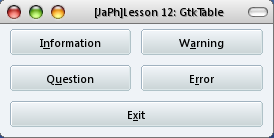


/*
* @author [JaPh]
* @date 23 August, 2009
* @file GtkTable_02.c
* @site http://xjaphx.blogspot.com/
*/

#include <gtk/gtk.h>

/* declare a message box widget */
GtkWidget *msg_box;

/* construct a message box dialog */
void
MessageBox( GtkMessageType mType, GtkButtonsType bType, const gchar *title,
const gchar *msg, const gchar *details )
{
/* message box response code */
int res;
/* create a message box dialog */
msg_box = gtk_message_dialog_new( NULL,
GTK_DIALOG_DESTROY_WITH_PARENT,
mType, bType, msg );
/* set message box title */
gtk_window_set_title( GTK_WINDOW( msg_box ), title );
/* set detail text */
gtk_message_dialog_format_secondary_text( GTK_MESSAGE_DIALOG( msg_box ), details );
/* run the message box dialog */
res = gtk_dialog_run( GTK_DIALOG( msg_box ) );
/* check for dialog response and handle */
if( res == GTK_RESPONSE_OK )
gtk_widget_destroy( msg_box );
}

void
btn_info_clicked( GtkButton *btn, gpointer data )
{
MessageBox( GTK_MESSAGE_INFO, GTK_BUTTONS_OK, "[JaPh] Dialog: INFO" ,
"GtkMessageDialog: Info", "Option: GTK_FILL; Spacing: 5,5; Coord: 0,0" );
}
void
btn_warn_clicked( GtkButton *btn, gpointer data )
{
MessageBox( GTK_MESSAGE_WARNING, GTK_BUTTONS_OK, "[JaPh] Dialog: WARNING",
"GtkMessageDialog: Warning", "Option: GTK_FILL; Spacing: 5,5; Coord: 0,1" );
}
void
btn_ques_clicked( GtkButton *btn, gpointer data )
{
MessageBox( GTK_MESSAGE_QUESTION, GTK_BUTTONS_OK, "[JaPh] Dialog: QUESTION",
"GtkMessageDialog: Question", "Option: GTK_FILL; Spacing: 5,5; Coord: 1,0" );
}
void
btn_erro_clicked( GtkButton *btn, gpointer data )
{
MessageBox( GTK_MESSAGE_ERROR, GTK_BUTTONS_OK, "[JaPh] Dialog: ERROR",
"GtkMessageDialog: Error", "Option: GTK_FILL; Spacing: 5,5; Coord: 1,1" );
}

int
main( int argc, char *argv[] )
{
GtkWidget *window;
GtkWidget *table;
GtkWidget *btn_info, *btn_warn,
*btn_ques, *btn_erro;
GtkWidget *btn_exit;

gtk_init( &argc, &argv );

window = gtk_window_new( GTK_WINDOW_TOPLEVEL );
gtk_window_set_title( GTK_WINDOW(window), "[JaPh]Lesson 12: GtkTable" );
gtk_window_set_default_size( GTK_WINDOW(window), 300, 300 );

table = gtk_table_new( 3, 2, TRUE );

btn_info = gtk_button_new_with_mnemonic("I_nformation");
btn_warn = gtk_button_new_with_mnemonic("W_arning");
btn_ques = gtk_button_new_with_mnemonic("Q_uestion");
btn_erro = gtk_button_new_with_mnemonic("E_rror");
btn_exit = gtk_button_new_with_mnemonic("E_xit");

gtk_table_attach( GTK_TABLE(table), btn_info,
0, 1, 0, 1,
GTK_FILL, GTK_FILL,
5, 5 );
gtk_table_attach( GTK_TABLE(table), btn_warn,
1, 2, 0, 1,
GTK_FILL, GTK_FILL,
5, 5 );
gtk_table_attach( GTK_TABLE(table), btn_ques,
0, 1, 1, 2,
GTK_FILL, GTK_FILL,
5, 5 );
gtk_table_attach( GTK_TABLE(table), btn_erro,
1, 2, 1, 2,
GTK_FILL, GTK_FILL,
5, 5 );
gtk_table_attach( GTK_TABLE(table), btn_exit,
0, 2, 2, 3,
GTK_FILL | GTK_EXPAND, GTK_FILL,
5, 5 );

g_signal_connect( GTK_BUTTON( btn_info ), "clicked",
G_CALLBACK( btn_info_clicked ), NULL );
g_signal_connect( GTK_BUTTON( btn_warn ), "clicked",
G_CALLBACK( btn_warn_clicked ), NULL );
g_signal_connect( GTK_BUTTON( btn_ques ), "clicked",
G_CALLBACK( btn_ques_clicked ), NULL );
g_signal_connect( GTK_BUTTON( btn_erro ), "clicked",
G_CALLBACK( btn_erro_clicked ), NULL );

g_signal_connect( GTK_BUTTON(btn_exit), "clicked",
G_CALLBACK( gtk_main_quit ), NULL );
g_signal_connect( G_OBJECT(window), "destroy",
G_CALLBACK( gtk_main_quit ), NULL );

gtk_container_add( GTK_CONTAINER(window), table );

gtk_widget_show_all( window );

gtk_main();
return 0;
}

It's the end of Lesson 12.

Have fun!@

Here a simple example of exporting C function to Nasm.


;
; @author [JaPh]
; @date 17 August, 2009
; @file 1.asm
; @site http://xjaphx.blogspot.com/
;
; @command
; assemble nasm -f elf -l 1.lst 1.asm
; link gcc -o 1 1.o
; run ./1
;

extern printf

SECTION .data

message: db "[JaPh]Hello World",0

SECTION .text

global main ; entry point

main:
push ebp
mov ebp, esp

push dword message ; address of 'message'
call printf ; printf()
add esp, 4 ; 1 push = 4 bytes

mov esp, ebp
pop ebp

mov eax, 0
ret

The equivalent program written in C

#include <stdio.h>

int
main( int argc, char *argv[] )
{
printf("[JaPh]Hello World");
return 0
}


Have fun!@

Now, I will introduce you a very, very popular widget that is used most of the time, GtkMessageDialog.

As you use software, sometimes it will pops up a small dialog that contains message which can be in types of either about Information, or Warning, or Question, or Error.
Like this:

Under Windows, it's known as MessageBox, right? You might be familiar with this Message Box already.

Let's look over its documentation.
Reference GtkMessageDialog

First of all, in the inherited hierarchy, GtkMessageDialog is from GtkDialog, so it certainly contains all the properties and accessing methods of GtkDialog. Simply, it's a pre-decorated dialog.

Secondly, these are the properties that you need to consider when creating a MessageDialog:
[+] Title: inherited from GtkWindow
[+] Dialog Flags: either GTK_DIALOG_MODAL or GTK_DIALOG_DESTROY_WITH_PARENT
[+] Message Type: is one of the four: GTK_MESSAGE_INFO, GTK_MESSAGE_WARNING, GTK_MESSAGE_QUESTION, GTK_MESSAGE_ERROR
[+] Button Type: either GTK_BUTTONS_*{ NONE, OK, CLOSE, CANCEL, YES_NO, OK_CANCEL } or you can create and add your own button by gtk_dialog_add_buttons().
[+] Secondary Text: is the detail info what you want to describe.

[!] 'Til now, since I haven't introduced about GtkDialog, but just stick with what I mention below:
- use gtk_dialog_run() to run the message dialog.
- gtk_dialog_run() return a response signal, therefore, always try to handle the signal.
- always use gtk_widget_destroy() to close message dialog, to avoid memory leak.
Some reference you need to read about what I mentioned:
Reference gtk_dialog_run()
Reference GtkResponseType

So far, it's enough for you at the present.

Practice: write a Gtk+ application that contains 4 buttons that will emits different types of GtkMessageDialog.


Try to read documentation and what I've mentioned so far then make your code. Make it simple and clear.

Below is my source for reference:


/*
* @author [JaPh]
* @date 15 August, 2009
* @file GtkMessageDialog_01.c
* @site http://xjaphx.blogspot.com/
*/

#include <gtk/gtk.h>

/* declare a message box widget */
GtkWidget *msg_box;

/* construct a message box dialog */
void
MessageBox( GtkMessageType mType, GtkButtonsType bType, const gchar *title,
const gchar *msg, const gchar *details )
{
/* message box response code */
int res;
/* create a message box dialog */
msg_box = gtk_message_dialog_new( NULL,
GTK_DIALOG_DESTROY_WITH_PARENT,
mType, bType, msg );
/* set message box title */
gtk_window_set_title( GTK_WINDOW( msg_box ), title );
/* set detail text */
gtk_message_dialog_format_secondary_text( GTK_MESSAGE_DIALOG( msg_box ), details );
/* run the message box dialog */
res = gtk_dialog_run( GTK_DIALOG( msg_box ) );
/* check for dialog response and handle */
if( res == GTK_RESPONSE_OK )
gtk_widget_destroy( msg_box );
}

void
btn_info_clicked( GtkButton *btn, gpointer data )
{
MessageBox( GTK_MESSAGE_INFO, GTK_BUTTONS_OK, "[JaPh] Dialog: INFO" ,
"GtkMessageDialog: Info", "This is an example of INFO Dialog" );
}
void
btn_warn_clicked( GtkButton *btn, gpointer data )
{
MessageBox( GTK_MESSAGE_WARNING, GTK_BUTTONS_OK, "[JaPh] Dialog: WARNING",
"GtkMessageDialog: Warning", "This is an example of WARNING Dialog" );
}
void
btn_ques_clicked( GtkButton *btn, gpointer data )
{
MessageBox( GTK_MESSAGE_QUESTION, GTK_BUTTONS_OK, "[JaPh] Dialog: QUESTION",
"GtkMessageDialog: Question", "This is an example of QUESTION Dialog" );
}
void
btn_erro_clicked( GtkButton *btn, gpointer data )
{
MessageBox( GTK_MESSAGE_ERROR, GTK_BUTTONS_OK, "[JaPh] Dialog: ERROR",
"GtkMessageDialog: Error", "This is an example of QUESTION Dialog" );
}

/* MAIN */
int
main( int argc, char *argv[] )
{
GtkWidget *window;
GtkWidget *vbox;
GtkWidget *btn_info, *btn_warn, *btn_ques, *btn_erro;
GtkWidget *btn_exit;

gtk_init( &argc, &argv );
/* construct main window */
window = gtk_window_new( GTK_WINDOW_TOPLEVEL );
gtk_window_set_title( GTK_WINDOW( window ), "[JaPh]Lesson 11: GtkMessageDialog" );
gtk_widget_set_size_request( window, 200, 180 );
/* create vbox layout */
vbox = gtk_vbox_new( TRUE, 5 );
/* create buttons */
btn_info = gtk_button_new_with_mnemonic( "Show _Info" );
btn_warn = gtk_button_new_with_mnemonic( "Show _Warning" );
btn_ques = gtk_button_new_with_mnemonic( "Show _Question" );
btn_erro = gtk_button_new_with_mnemonic( "Show _Error" );
btn_exit = gtk_button_new_with_mnemonic( "E_xit" );
/* pack buttons to vbox from TOP to BOTTOM */
gtk_box_pack_start( GTK_BOX(vbox), btn_info, TRUE, TRUE, 0 );
gtk_box_pack_start( GTK_BOX(vbox), btn_warn, TRUE, TRUE, 0 );
gtk_box_pack_start( GTK_BOX(vbox), btn_ques, TRUE, TRUE, 0 );
gtk_box_pack_start( GTK_BOX(vbox), btn_erro, TRUE, TRUE, 0 );
gtk_box_pack_start( GTK_BOX(vbox), btn_exit, TRUE, TRUE, 0 );
/* add layout widget to main window */
gtk_container_add( GTK_CONTAINER(window), vbox );
/* button signal */
g_signal_connect( GTK_BUTTON( btn_info ), "clicked",
G_CALLBACK( btn_info_clicked ), NULL );
g_signal_connect( GTK_BUTTON( btn_warn ), "clicked",
G_CALLBACK( btn_warn_clicked ), NULL );
g_signal_connect( GTK_BUTTON( btn_ques ), "clicked",
G_CALLBACK( btn_ques_clicked ), NULL );
g_signal_connect( GTK_BUTTON( btn_erro ), "clicked",
G_CALLBACK( btn_erro_clicked ), NULL );

g_signal_connect( GTK_BUTTON( btn_exit), "clicked",
G_CALLBACK( gtk_main_quit ), NULL );
/* window signal */
g_signal_connect( window, "destroy", G_CALLBACK( gtk_main_quit ), NULL );
/* show window & widgets */
gtk_widget_show_all( window );

/* run Gtk+ app */
gtk_main();
return 0;
}

Remember to keep your practice always, don't forget!

Have fun!@

Like Windows, Linux also provides modules for creating static library.

1. What is static library?
[A] It's a library that contains a list of API for a certain work, or to do something specifically that is pre-compiled and you don't have to recompile it again. If you know more about Linux, then you may know that a static library simply is just a compilation or a package of object code.
[*] Static library under Linux has extension ".a", while it is ".lib" in Windows.

2. What is the purpose of static library?
[A] As far as I know, firstly, since it's a library, it certainly gives APIs for convenient programming. It's already precompiled, so it costs less time to compile and load APIs than other types of libraries. Additionally, in case the author of the library wants to hide the actual source code.

3. When should I use static library?
[A] Well, you can use it any time you want. However, nowadays, Linux-ers don't prefer static library due to the faster computers and compilers.

Let's create our first Linux static library. Certainly, the programming language in use is C, or you can use C++.

I - Creating the library
1. Prepare:
[+] You need to create 2 files: one is the header, one is the source.
[+] Naming: all Linux libraries start with prefix "lib"

--[libhello.h]--


/*
* @author [JaPh]
* @date 14 August, 2009
* @file libhello.h
* @license freeware
*/

void hello( );

--[libhello.c]--

/*
* @author [JaPh]
* @date 14 August, 2009
* @file libhello.c
* @license freeware
*/

#include <stdio.h>

void hello( ) {
printf("[JaPh]Tutorial: Creating Linux Static Library\n"
"Message: Hello! This is a static library.\n");
}

2 - Compile the object code

[japh@localhost C]$ gcc -c libhello.c

3 - Create the library

[japh@localhost C]$ ar -cvsq libhello.a libhello.o
a - libhello.o

Finally, the file libhello.a created. This is our target static library

II - Use the library
The next thing we need to do is to test whether our library works or not.
Let's write a simple program to call the function hello() inside the library libhello.a

--[hello_main.c]--

/*
* @author [JaPh]
* @date 14 August, 2009
* @file hello_main.c
* @license freeware
*/

#include "libhello.h"

int main( ) {
hello( );
return 0;
}

Then compile:

[japh@localhost C]$ gcc -o hello hello_main.c -L/path/to/library -lhello

You need to specify the location where you put the file libhello.a
Since it's a standard under Linux, you don't have to specify -libhello, use -lhello instead.
Finally, run our program

[japh@localhost C]$ ./hello
[JaPh]Tutorial: Creating Linux Static Library
Message: Hello! This is a static library.

There you have your first Linux static library. Pretty simple and very handy
If you don't want to type again and again for those steps, I've written this tiny script for auto-work everything. You just need to put all 3 files above into the same directory, then run the script below. You can change things in the script for personally wants.

#!/bin/sh
echo "[1] Compiling Object Code"
gcc -Wall -c libhello.c

echo "[2] Creating library"
ar -cvsq libhello.a libhello.o

echo "[3] Compiling program"
gcc -o hello hello_main.c -L. -lhello

echo "[4] Running program"
./hello


Well, that's all I have for you in this topic.

Have fun!@

I have introduced about GtkVBox in the previous lesson; however, GtkHBox is basically the same as GtkVBox. The only difference is the horizontal arrangement of GtkHBox.
Reference GtkHBox

Things do the same.
So just try to mix GtkHBox and GtkVBox you can do a small application like this:Why not make it a practice?

Detail: an Gtk+ application, like a phone dial

When you done, you can check out my source below, it's pretty handy though...


/*
* @author [JaPh]
* @date August 12, 2009
* @file GtkHVBox_01.c
* @site http://xjaphx.blogspot.com/
*/

#include <gtk/gtk.h>
#include <string.h>

void
gtk_label_append_text( GtkLabel *label, char *s )
{
int len = strlen( gtk_label_get_text( label ));
gchar buf[128];
snprintf( buf, len + 2, "%s%s", gtk_label_get_text( label ), s );
gtk_label_set_text( label, buf );
}

void
btn1_clicked_event( GtkButton *btnN, GtkLabel *label )
{
gtk_label_append_text( label, "1");
}
void
btn2_clicked_event( GtkButton *btnN, GtkLabel *label )
{
gtk_label_append_text( label, "2");
}
void
btn3_clicked_event( GtkButton *btnN, GtkLabel *label )
{
gtk_label_append_text( label, "3");
}
void
btn4_clicked_event( GtkButton *btnN, GtkLabel *label )
{
gtk_label_append_text( label, "4");
}
void
btn5_clicked_event( GtkButton *btnN, GtkLabel *label )
{
gtk_label_append_text( label, "5");
}
void
btn6_clicked_event( GtkButton *btnN, GtkLabel *label )
{
gtk_label_append_text( label, "6");
}
void
btn7_clicked_event( GtkButton *btnN, GtkLabel *label )
{
gtk_label_append_text( label, "7");
}
void
btn8_clicked_event( GtkButton *btnN, GtkLabel *label )
{
gtk_label_append_text( label, "8");
}
void
btn9_clicked_event( GtkButton *btnN, GtkLabel *label )
{
gtk_label_append_text( label, "9");
}

void
btn_clear_clicked_event( GtkButton *btn_clear, GtkLabel *label )
{
gtk_label_set_text( label, " " );
}

int
main( int argc, char *argv[] )
{
GtkWidget *window;
GtkWidget *vbox;
GtkWidget *label;
GtkWidget *hbox1, *hbox2, *hbox3, *hbox4;
GtkWidget *btn1, *btn2, *btn3, *btn4,
*btn5, *btn6, *btn7, *btn8, *btn9;
GtkWidget *btn_clear, *btn_exit;

gtk_init( &argc, &argv );

/* window */
window = gtk_window_new( GTK_WINDOW_TOPLEVEL );
gtk_window_set_title( GTK_WINDOW(window), "[JaPh]Lesson 10: GtkHBox & GtkVBox" );
gtk_widget_set_size_request( window, 300, 300 );

/* top level vbox */
vbox = gtk_vbox_new( TRUE, 0 ) ;

/* hbox1: btn1, btn2, btn3 */
hbox1 = gtk_hbox_new( TRUE, 0 );
btn1 = gtk_button_new_with_label("1");
btn2 = gtk_button_new_with_label("2");
btn3 = gtk_button_new_with_label("3");
gtk_box_pack_start( GTK_BOX( hbox1 ), btn1, TRUE, TRUE, 5 );
gtk_box_pack_start( GTK_BOX( hbox1 ), btn2, TRUE, TRUE, 5 );
gtk_box_pack_start( GTK_BOX( hbox1 ), btn3, TRUE, TRUE, 5 );

/* hbox2: btn4, btn5, btn6 */
hbox2 = gtk_hbox_new( TRUE, 0 );
btn4 = gtk_button_new_with_label("4");
btn5 = gtk_button_new_with_label("5");
btn6 = gtk_button_new_with_label("6");
gtk_box_pack_start( GTK_BOX( hbox2 ), btn4, TRUE, TRUE, 5 );
gtk_box_pack_start( GTK_BOX( hbox2 ), btn5, TRUE, TRUE, 5 );
gtk_box_pack_start( GTK_BOX( hbox2 ), btn6, TRUE, TRUE, 5 );

/* hbox3: btn7, btn8, btn9 */
hbox3 = gtk_hbox_new( TRUE, 0 );
btn7 = gtk_button_new_with_label("7");
btn8 = gtk_button_new_with_label("8");
btn9 = gtk_button_new_with_label("9");
gtk_box_pack_start( GTK_BOX( hbox3 ), btn7, TRUE, TRUE, 5 );
gtk_box_pack_start( GTK_BOX( hbox3 ), btn8, TRUE, TRUE, 5 );
gtk_box_pack_start( GTK_BOX( hbox3 ), btn9, TRUE, TRUE, 5 );

/* hbox4: btn_clear, btn_exit */
hbox4 = gtk_hbox_new( TRUE, 0 );
btn_clear = gtk_button_new_with_label("Clear");
btn_exit = gtk_button_new_with_label("Exit");
gtk_box_pack_start( GTK_BOX( hbox4 ), btn_clear, TRUE, TRUE, 5 );
gtk_box_pack_start( GTK_BOX( hbox4 ), btn_exit, TRUE, TRUE, 5 );

/* vbox: hbox1, hbox2, hbox3, hbox4 */
label = gtk_label_new("Click any number button");
gtk_box_pack_start( GTK_BOX( vbox ), label, TRUE, TRUE, 0 );
gtk_box_pack_start( GTK_BOX( vbox ), hbox1, TRUE, TRUE , 5 );
gtk_box_pack_start( GTK_BOX( vbox ), hbox2, TRUE, TRUE , 5 );
gtk_box_pack_start( GTK_BOX( vbox ), hbox3, TRUE, TRUE , 5 );
gtk_box_pack_start( GTK_BOX( vbox ), hbox4, TRUE, TRUE , 5 );

/* add to window */
gtk_container_add( GTK_CONTAINER( window ), vbox );

/* signal connect */
/* window */
g_signal_connect( window, "destroy",
G_CALLBACK( gtk_main_quit ), NULL );

/* btn1->9 */
g_signal_connect( GTK_BUTTON( btn1 ), "clicked",
G_CALLBACK( btn1_clicked_event ), GTK_LABEL( label ) );

g_signal_connect( GTK_BUTTON( btn2 ), "clicked",
G_CALLBACK( btn2_clicked_event ), GTK_LABEL( label ) );

g_signal_connect( GTK_BUTTON( btn3 ), "clicked",
G_CALLBACK( btn3_clicked_event ), GTK_LABEL( label ) );

g_signal_connect( GTK_BUTTON( btn4 ), "clicked",
G_CALLBACK( btn4_clicked_event ), GTK_LABEL( label ) );

g_signal_connect( GTK_BUTTON( btn5 ), "clicked",
G_CALLBACK( btn5_clicked_event ), GTK_LABEL( label ) );

g_signal_connect( GTK_BUTTON( btn6 ), "clicked",
G_CALLBACK( btn6_clicked_event ), GTK_LABEL( label ) );

g_signal_connect( GTK_BUTTON( btn7 ), "clicked",
G_CALLBACK( btn7_clicked_event ), GTK_LABEL( label ) );

g_signal_connect( GTK_BUTTON( btn8 ), "clicked",
G_CALLBACK( btn8_clicked_event ), GTK_LABEL( label ) );

g_signal_connect( GTK_BUTTON( btn9 ), "clicked",
G_CALLBACK( btn9_clicked_event ), GTK_LABEL( label ) );


/* btn_clear */
g_signal_connect( GTK_BUTTON( btn_clear ), "clicked",
G_CALLBACK( btn_clear_clicked_event ), GTK_LABEL( label ) );

/* btn_exit */
g_signal_connect( GTK_BUTTON(btn_exit), "clicked",
G_CALLBACK( gtk_main_quit ), NULL );

gtk_widget_show_all( window );

gtk_main();

return 0;
}

Gtk+ Programming Series
Creator: [JaPh]

I'm currently making this series. Everything is simple and not so hard at all.
I will try to make it simple, however you need to know the basic of programming and Linux before starting to read this series.

Tutorial 1 - Hello World
Tutorial 2 - Gtk+ Package Dependencies
Tutorial 3 - Simple Gtk+ Window
Tutorial 4 - Preparation for Gtk+ Programming
Tutorial 5 - GtkWindow
Tutorial 6 - GtkLabel
Tutorial 7 - GtkButton
Tutorial 8 - GtkContainer
Tutorial 9 - GtkVBox
Tutorial 10 - GtkHBox & GtkVBox (Practice)
Tutorial 11 - GtkMessageDialog
Tutorial 12 - GtkTable
Tutorial 13 - GtkEntry

[ to be continued... ]

Have fun!@

The next widget in our discussion today is GtkVBox. As I mentioned in the previous post, GtkVBox is one of the Layout Container, which is to contain one or more child widgets and arrange them in a certain order as well, specifically, GtkVBox arranges child widgets in column order.
Let's look at the reference first:
+ Reference to GtkVBox
+ Reference to GtkBox

As you see in the hierarchy, GtkVBox is inherited from GtkBox; hence, it's a GtkBox as well. We will need to apply characteristics of GtkBox to GtkVBox; simply, use a GtkVBox as a GtkBox.

First, we need to create a GtkVBox (vertical layout)


GtkWidget * gtk_vbox_new ( gboolean homogeneous, gint spacing );

So, if I want to create a VBox and share the same space allotments for all children w/ 10 pixels spacing between them, the code will be:

GtkWidget *vbox;

vbox = gtk_vbox_new( TRUE, 10 );

Next is to add children to the box layout. Since GtkVBox is a vertical layout manager, therefore, every elements added to the layout will be in this order.
In layout container, the step or method of adding more child widgets is so called "Pack".
If you pay attention to the reference manual, there are 2 methods to pack child:

void gtk_box_pack_start(
GtkBox *box,
GtkWidget *child,
gboolean expand,
gboolean fill,
guint padding );

void gtk_box_pack_end(
GtkBox *box,
GtkWidget *child,
gboolean expand,
gboolean fill,
guint padding );

You may wonder what the differences in pack_start and pack_end are?
The explanation is simple, since it's like a column, you can either specify to pack child from top to bottom or vice versa.
If you want to pack child from top to bottom, use gtk_box_pack_start(). The first child will be at the top, the next child will be arranged below the previous one....and so on.
The same w/ gtk_box_pack_end() if you want to pack from bottom to top.

Well, not much to say about layout. You can find out more information that you need on reference manual.

Let's do a simple Gtk application w/ GtkVBox.

Practice 1: A Gtk application with a label and an Exit button packed in GtkVBox.
You'd better code first then look at my source to make sure you're fine.

/*
* @author [JaPh]
* @date August 08, 2009
* @file GtkVBoxp_01.c
* @site http://xjaphx.blogspot.com/
*/

/* HEADER */
#include <gtk/gtk.h>
#include <glib.h>

/* EVENT */
void
button_clicked_event( GObject *button, gpointer data )
{
gtk_main_quit();
}

/* MAIN */
int
main( int argc, char *argv[] )
{
/* 1. declare widgets */
GtkWidget *window;
GtkWidget *vbox;
GtkWidget *button;
GtkWidget *label;

/* 2. init gtk app */
gtk_init( &argc, &argv );

/* 3. init all widgets */
window = gtk_window_new( GTK_WINDOW_TOPLEVEL );
gtk_window_set_title( GTK_WINDOW( window ), "[JaPh]Lesson 4: GtkVBox" );
gtk_widget_set_size_request( window, 200, 200 );
/* 3a. create new vbox widget */
vbox = gtk_vbox_new( FALSE, 10 );

label = gtk_label_new("Click Exit button to exit.");

button = gtk_button_new_with_label("Exit");
/* 3b. add child widgets to vbox from top to bottom */
gtk_box_pack_start( GTK_BOX( vbox ), label, FALSE, FALSE, 10 );
gtk_box_pack_start( GTK_BOX( vbox ), button, FALSE, FALSE, 10 );
/* 4. add vbox to main window */
gtk_container_add( GTK_CONTAINER( window ), vbox );

/* 5. signal connect */
g_signal_connect( G_OBJECT( window ), "destroy", G_CALLBACK( gtk_main_quit ), NULL );
g_signal_connect( G_OBJECT( button ), "clicked", G_CALLBACK( button_clicked_event ), NULL );

/* 6. show window */
gtk_widget_show_all( window );

/* 7. activate gtk app */
gtk_main();

/* 8. return code */
return 0;
}

Practice 2: Make an Gtk application w/ a GtkLabel to hold an integer value, one GtkButton click to increase value, one GtkButton click to decrease value; the last button to exit program.

/*
* @author [JaPh]
* @date August 08, 2009
* @file GtkVBoxp_02.c
* @site http://xjaphx.blogspot.com/
*/

/* HEADER */
#include <gtk/gtk.h>

/* FUNCTION DEF. */
static int counter = 0;

void
btn_inc_clicked_event( GtkButton *btn_inc, GtkLabel *label )
{
++counter;
gchar counter_buf[10];
g_snprintf( counter_buf, 9, "%d", counter );
gtk_label_set_text( label, counter_buf );
}

void
btn_dec_clicked_event( GtkButton *btn_dec, GtkLabel *label )
{
--counter;
gchar counter_buf[10];
g_snprintf( counter_buf, 9, "%d", counter );
gtk_label_set_text( label, counter_buf );
}

/* MAIN */
int
main( int argc, char *argv[] )
{
GtkWidget *window;
GtkWidget *vbox;
GtkWidget *label;
GtkWidget *btn_inc, *btn_dec, *btn_exit;

gtk_init( &argc, &argv );

window = gtk_window_new( GTK_WINDOW_TOPLEVEL );
gtk_window_set_title( GTK_WINDOW( window ), "[JaPh]Lesson 4: GtkVBox" );
gtk_widget_set_size_request( window, 200, 200 );

vbox = gtk_vbox_new( TRUE, 5 );

label = gtk_label_new("0");

btn_inc = gtk_button_new_with_mnemonic("I_ncrease");
btn_dec = gtk_button_new_with_mnemonic("D_ecrease");
btn_exit = gtk_button_new_with_mnemonic("E_xit");

/* packing */
gtk_box_pack_start( GTK_BOX( vbox ), label, FALSE, FALSE, 5 );
gtk_box_pack_start( GTK_BOX( vbox ), btn_inc, FALSE, FALSE, 5 );
gtk_box_pack_start( GTK_BOX( vbox ), btn_dec, FALSE, FALSE, 5 );
gtk_box_pack_start( GTK_BOX( vbox ), btn_exit, FALSE, FALSE, 5 );

gtk_container_add( GTK_CONTAINER( window ), vbox );

/* signal & event */
g_signal_connect( GTK_BUTTON( btn_inc ), "clicked",
G_CALLBACK( btn_inc_clicked_event ), GTK_LABEL( label ) );

g_signal_connect( GTK_BUTTON( btn_dec ), "clicked",
G_CALLBACK( btn_dec_clicked_event ), GTK_LABEL( label ) );

g_signal_connect( GTK_BUTTON( btn_exit ), "clicked",
G_CALLBACK( gtk_main_quit ), NULL );

g_signal_connect_swapped( G_OBJECT( window ), "destroy",
G_CALLBACK( gtk_main_quit ), NULL );

gtk_widget_show_all( window );

gtk_main();
return 0;
}

Take your time to practice and do more exercises from your already-known GtkWidget.

Have fun!@

My friend asked me for illustrating the idea of function pointer.
Then I wrote this small code for him.


/* HEADER */
#include <stdio.h>
/* DECLARE */
int Calculate( int, int, int (*pFunc)( int, int ) );

int Add( int, int );
int Sub( int, int );
int Mul( int, int );

/* MAIN */
int
main( int argc, char *argv[] )
{
int (*p)(int, int) = NULL;

printf("[ USING REFERENCE ]\n");
printf("Result = %d\n", Calculate( 4, 5, &Add ) );
printf("Result = %d\n", Calculate( 4, 5, &Sub ) );
printf("Result = %d\n", Calculate( 4, 5, &Mul ) );

printf("[ USING POINTER ]\n");
p = &Add;
printf("P Result = %d\n", Calculate( 4, 5, p ) );
p = ⋐
printf("P Result = %d\n", Calculate( 4, 5, p ) );
p = &Mul;
printf("P Result = %d\n", Calculate( 4, 5, p ) );
return 0;
}

/* DEFINITION */
int
Calculate( int a, int b, int (*pFunc)( int, int ) )
{
return pFunc( a, b );
}

int Add( int a, int b )
{
return ( a + b );
}

int Sub( int a, int b )
{
return ( a - b );
}

int Mul( int a, int b )
{
return ( a * b );
}

Have fun!@

1. First you need to register your key here


Windows Registry Editor Version 5.00

[HKEY_LOCAL_MACHINE\SOFTWARE\Microsoft\Windows NT\CurrentVersion\Windows]
"AppInit_DLLs"="AppInitDLL.dll"
"LoadAppInit_DLLs"=dword:00000001

2. Open VC++ create a Win32 DLL Project

Source below just to test if it works

#include

BOOL APIENTRY DllMain( HINSTANCE hInstance, DWORD reason, LPVOID reserved )
{
switch( reason )
{
case DLL_PROCESS_ATTACH:
MessageBoxA( NULL, "Hey! It works!", "Calling", 0 );
break;
default:
break;
}

return TRUE;
}

3. Build project in Release mode then put the DLL file into C:\Windows\

4. Try to run any application


[*] Evaluation:
- It's very incovenient since the DLL will be called by every single process which imported from user32.dll

Have fun!@

This is the most simple version of DLL Injection

1. VC++ 2k5 (any version is ok), New Project -> Win32 Project
- Empty Project DLL

2. Add new C source file:


#include <windows.h>

BOOL APIENTRY DllMain( HINSTANCE hIns, DWORD reason, LPVOID reserved )
{
switch( reason )
{
case DLL_PROCESS_ATTACH:
MessageBoxA( NULL, "Process Attach", "MsgBox", 0 );
break;
case DLL_PROCESS_DETACH:
MessageBoxA( NULL, "Process Detach", "MsgBox", 0 );
break;
case DLL_THREAD_ATTACH:
MessageBoxA( NULL, "Thread Attack", "MsgBox", 0 );
break;
case DLL_THREAD_DETACH:
MessageBoxA( NULL, "Thread Detach", "MsgBox", 0 );
break;
}

return TRUE;
}

3. Build project in Release mode.

4. Use a DLL Injector to inject this DLL into any process.
- You can use this Injector: Winject (by mcMike)

[*] I will mention about writing injector later on.

Have fun!@

Have you done practice GtkWindow and GtkLabel well?
Now, it's time to introduce new widget: GtkButton, simply a button, which can be pressed in order to do something. This is a very common widget used in every application.

First thing first, you need to look over the reference for GtkButton: GtkButton Reference

Practice 1: Create a button on a window labeled as "Exit", the button-clicking event will exit program.


#include <gtk/gtk.h>

int
main( int argc, char *argv[] )
{
GtkWidget *window;
GtkWidget *button;

gtk_init( &argc, &argv );

window = gtk_window_new( GTK_WINDOW_TOPLEVEL );
gtk_window_set_title( GTK_WINDOW( window ), "[JaPh]Lesson 3: GtkButton" );
gtk_widget_set_size_request( window, 50, 50 );

// create a new button with label: Exit
button = gtk_button_new_with_label( "Exit" );

// if you want to use combination with Alt + X
//button = gtk_button_new_with_mnemonic( "E_xit" );

// add button to main window
gtk_container_add( GTK_CONTAINER( window ), button );

g_signal_connect( G_OBJECT(window), "destroy", G_CALLBACK( gtk_main_quit ), NULL );
// connect button click event
g_signal_connect( G_OBJECT(button), "clicked", G_CALLBACK( gtk_main_quit ), NULL );

gtk_widget_show_all( window );

gtk_main( );

return 0;
}


Practice 2: Click a button will increase a count value by 1, if the count value is divisible by 3, then exit immediately.


#include <gtk/gtk.h>
#include <glib.h>

static gint count = 0;

void
btn_count_clicked_event( GtkButton *button, gpointer p )
{
++count;
g_print("Count = %d\n", count );
if( count % 3 == 0) {
g_print("Exit\n");
gtk_main_quit( );
}
}

int
main( int argc, char *argv[] )
{
GtkWidget *window;
GtkWidget *btn_count;

gtk_init( &argc, &argv );

window = gtk_window_new( GTK_WINDOW_TOPLEVEL );
gtk_window_set_title( GTK_WINDOW( window ), "[JaPh]Lesson 3: GtkButton" );
gtk_widget_set_size_request( window, 100, 50 );

btn_count = gtk_button_new_with_mnemonic(" C_ount ");

gtk_container_add( GTK_CONTAINER( window ), btn_count );

g_signal_connect( G_OBJECT( window ), "destroy", G_CALLBACK( gtk_main_quit), NULL );
g_signal_connect( G_OBJECT( btn_count ), "clicked", G_CALLBACK( btn_count_clicked_event ), NULL );

gtk_widget_show_all( window );

gtk_main( );

return 0;
}

GtkButton is a quite very easy widget, so you just need to practice for a while.

The next tutorial lesson will talk about container classes, GtkContainer.

Keep on practice w/ Gtk+ programming everyday, ok?

Have fun!@